Skip to product information
1 of 7

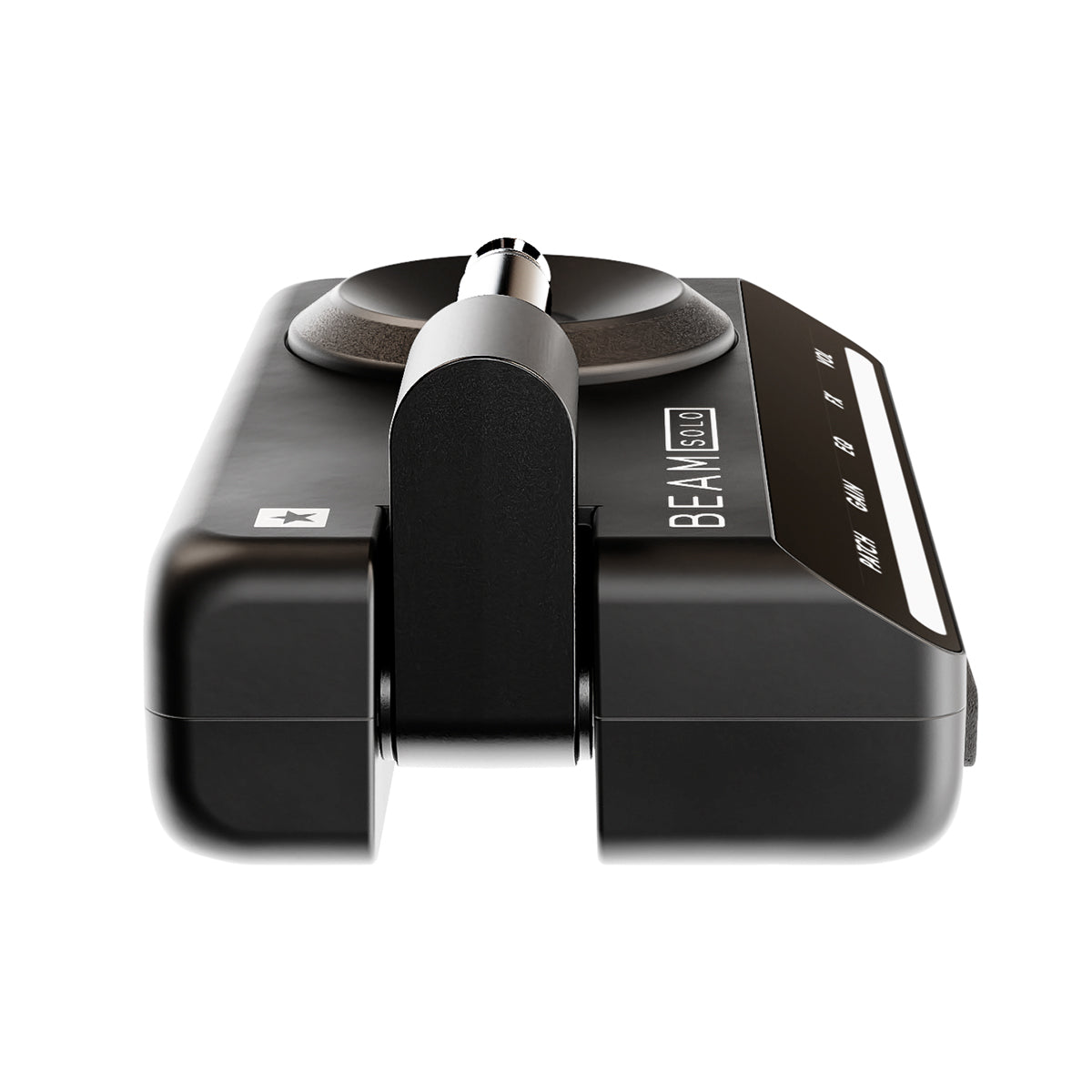
Beam Solo

Beam Solo

Wireless Headphone Amp with Studio Sound and Smart Features

SKU:BEAMSOLO

Delivery information · Returns policy

FIND A DEALER

Description

The Ultimate Portable Guitar Tone with App Control 

Tap into inspiring guitar tones anywhere, anytime — the Beam Solo Headphone Amplifier delivers studio-quality tones straight to your headphones. Access hundreds of amp/mic/effects combinations, tap into a thriving community of tone creators, and make the most of every musical session.

Specifications

Approximate battery life (charged via USB-C): 5 hours+
Dynamic Light Beam display:Y
XPressFX quick parameter changes using SpeedDial: Y
Amplifiers: 8+
Effects: 35+
ISF (patented Infinite Shape Feature): Y
IR-based CabRig speaker simulator with In The Room™: Y
Cabinet and microphone combinations: 9+
Room environment combinations: 9+
Multi-channel direct recording (via USB-C): Y
3.5mm headphone jack socket with headset mic input: Y
¼" jack (integrated, folding):Y
Save and recall patches: Y

Share patches via Online Community and socials: Y

Built-in tuner: Y

Bluetooth connectivity for music playback: Y

BEAM mobile app for iOS and Android: Y

View full details
Over the shoulder view of a guitarist holding a smartphone with the Moises app interface open, and the Moises logo in the top-left corner.

Integrated Moises AI Stem Separation

Beam Solo integrates Moises stem separation, letting you isolate or remove guitars from any song. Want to play along with a classic track? Remove the guitar and step into the player’s shoes, or isolate a part to study every detail of the performance.

This gives musicians a completely new way to practise, learn, and play along with their favourite music.

Moises integration is available on iPhone and compatible Android devices.

Your Effects– On SpeedDial

XpressFX, instantly adjusts the intensity of all your effects using the SpeedDial – intuitive control for fast and easy sound shaping.

In The Room Experience

Experience the immersive sound and feel of being stood next to a real amplifier. Our unique ‘In the Room’ technology brings the raw power of an amp straight into your headphones, making you feel like you’re standing right in front of it.

Your Voice.
Your Riff.

Experience your guitar and vocals in perfect harmony using a headset mic, creating a rich, immersive sound right in your headphones.

1 of 6
  • BEAM App

    Explore 50+ amps, cabs, mics and pedals – endless sounds at your fingertips.

  • CabRig

    Immersive IR based cabinet and mic simulation.

  • SpeedDial

    Intuitive SpeedDial™ with responsive light Beam.

  • Xpress FX

    Expression at your fingertips.

  • In The Room

    Feel the punch of a real amp, even in your headphones.

1 of 5

Get Your Beam Solo

Support & Documentation

Quick Start Guide

Owner's Manual

Safety Warnings

Manufacturer's Details

Designed and Engineered by
BLACKSTAR AMPLIFICATION LTD
Beckett House, 14 Billing Road, Northampton, NN1 5AW, UK
Tel: +44 (0)1604 817817
help@blackstaramps.com

EU Responsible Person

EAS Europe
Mustamäe tee 50, 10621 Tallinn, Estonia
easproject.com, +372 5696 8939, gpsr.requests@easproject.com


FAQs

Beam Bluetooth Connection Help

Please use our helpful guide to get you connected: Beam Connection Guide

Is Moises integration available on Android?

Yes. Moises integration is available on compatible Android devices. Please see “Is my device compatible with the Beam app and Moises integration?” for device requirements.

I’ve updated the firmware and now my amp won’t connect to the Beam app?

Please ensure you have updated your app to the latest version and have used it to install the latest firmware update on your beam solo or beam mini.

How do I connect my Beam to Moises?

Connect your iPhone to your Beam Mini or Beam Solo with a USB-C cable and launch the Moises app (or launch the Moises app directly from the Beam app by tapping the Moises logo). If you have an iPhone 14 or earlier, your device has a Lightning connector instead of USB-C. To connect to your Beam device, you’ll need a Lightning-to-USB-C adapter (not just a Lightning-to-USB-C cable), which you can find out more about here. Once correctly connected, the Moises app will display the name of your Beam device and you can start playing music from your phone and adjust the levels of each stem directly within the Moises app.

How many stems does the Beam Moises integration support?

You can adjust volumes three stems – Guitar, Vocals, and Other (all other audio in the track) while connected to your Beam Mini or Beam Solo.

Does the Beam Moises integration require an internet connection?

If you don’t have the Moises app you’ll need a connection to download it, but if you’re already set up it won’t require an active internet connection to play audio that’s already stored on your phone. You may need an internet connection to stream music from your chosen provider.

Does the Beam Moises integration work with any phone?

The Beam Moises integration works with compatible iPhone and Android devices. Please see “Is my device compatible with the Beam app and Moises integration?” for device requirements before purchasing.

Is the Beam Moises feature free?

Anyone with either a Beam Mini or Beam Solo and the Moises app can fully adjust the guitar stem or isolate the guitar completely for free. Other stems can be adjusted down to 25% volume with the free Beam license of Moises. If you have a Pro or Premium Moses subscription, you will be able to isolate all stems and adjust their levels down to zero.

Is my device compatible with the Beam app and Moises integration?

Please check the full list of compatible devices to verify your device is compatible.